
|
Tawrat TechnologyWebsite: https://tawrattechnology.com |
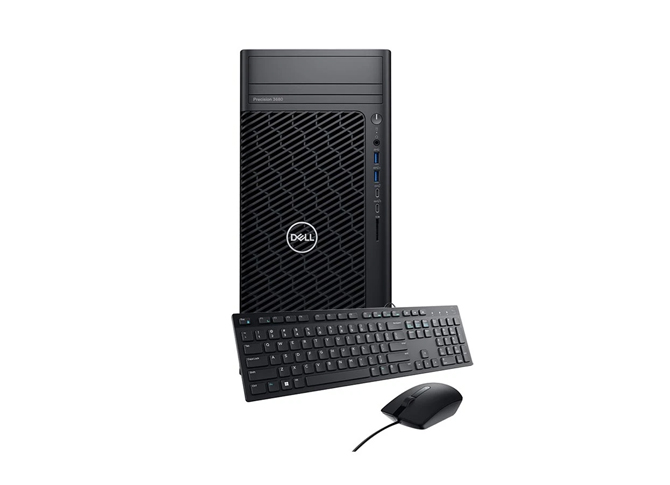
Dell OptiPlex 7010 13th Gen Intel Core i5 13500 8GB DDR4, 512GB SSD Black Tower Brand PC
Features
| Brand | Dell |
| Origin | United States |
| Category | Computer Science and Engineering, Desktop, Dell |
| Price |
BDT 80,290.00
|
Short Description
Model: Dell OptiPlex 7010
- Form Factor - Tower
- Processor Type - Core i5
- Processor Max Turbo Frequency - 4.80GHz
- RAM - 8GB
- Hard Disk Drive (HDD) - No
- Solid-State Drive (SSD) - 512GB
- Graphics Memory - Shared
Specifications
General
Brand: Dell
Model: Dell OptiPlex 7010
Processor
Processor Brand: Intel
Generation: 13th
Processor Type: Core i5
Processor Model: Core i5 13500
Processor Base Frequency: Unmentioned
Performance-Core Base Frequency: 2.50GHz
Efficient-Core Base Frequency: 1.80GHz
Processor Max Turbo Frequency: 4.80GHz
Performance-Core Max Turbo Frequency: 4.80GHz
Efficient-Core Max Turbo Frequency: 3.50GHz
Processor Core: 14
Performance-Cores: 6
Efficient-Cores: 8
Processor Thread: 20
CPU Cache: 24MB
Chipset: Intel Q670
Memory
RAM: 8GB
Installed RAM Details: 1 x 8GB Removable
RAM Type: DDR4
Total RAM Slot: 2
Empty/Expansion RAM Slot: 1
Max. RAM Support: Unmentioned
Optane Memory: No
Storage
Hard Disk Drive (HDD): No
Installed HDD Type: No HDD
RPM: No
HDD Expansion Slot: Unmentioned
Solid-State Drive (SSD): 512GB
Installed SSD Type: NVMe PCIe
3.5 Inch Bay/Slot: 3
Graphics
Graphics Chipset: Intel UHD Graphics 770
Graphics Memory Accessibility: Integrated
Graphics Memory: Shared
Graphics Memory Type: Not Applicable
Ports & Slots
Optical Drive: DVD RW
Expansion Slots: 3
Multimedia Card Slot: No
USB Port: 2 x USB 3.2 Gen 1 Type-A, 2 USB 2.0 Type-A (Front), 2 x USB 3.2 Gen 1 Type-A, 2 x USB 2.0 Type-A (Rear)
USB C / Thunderbolt Port: No
HDMI Port: 1
DisplayPort (DP): 1
Mini DisplayPort: No
VGA/D-Sub: No
DVI Port: No
Security Lock Slot: Firmware TPM
Network & Connectivity
LAN: Yes
WiFi: No
Bluetooth: No
Audio
Audio Port: Combo
Speaker (Built-in): Yes
Software
TPM: Yes
Operating System: Free-Dos
Physical Description
Form Factor: Tower
Monitor: No Monitor
Keyboard: USB Keyboard
Mouse: USB Mouse
Power Supply: 180W
Dimension: 324.3 x 292.2 x 154mm
Weight: 6.52 kg
Body Color: Black
Warranty
Warranty Details: 3 Year (Box Mandatory While Claiming)
Additional Info
Specialty: Get the most out of your OptiPlex, Immersive workflow, Seamless collaboration, Stunning views, Upgraded inside and out
Country Of Origin: USA
Made in/ Assemble: China
Description
Features of Dell OptiPlex 7010 Brand PC In Bangladesh
Introducing the Dell OptiPlex 7010, powered by the 13th Gen Intel Core i5 13500 processor. This robust Black Tower Brand PC combines performance, reliability, and a sleek design, making it an excellent choice for both home and office use. With 8GB DDR4 RAM and a 512GB SSD, the OptiPlex 7010 delivers fast multitasking capabilities and ample storage for all your essential applications and files.
Features and Benefits
- 13th Gen Intel Core i5 13500: Experience superior processing power that enhances productivity and allows you to run demanding applications seamlessly.
- 8GB DDR4 RAM: Enjoy smooth multitasking and quick response times for an efficient workflow, whether for work or entertainment.
- 512GB SSD: Benefit from fast boot times and rapid access to files, improving overall system performance and efficiency.
- Compact Design: The tower's sleek and space-saving design makes it ideal for any workspace, ensuring it fits seamlessly into your environment.
- Windows 11 Ready: Comes pre-installed with the latest operating system, providing an intuitive user experience and enhanced security features.
- Versatile Connectivity: Equipped with multiple USB ports, HDMI, and Ethernet connections, making it easy to connect peripherals and accessories.
How to Maintain
- To ensure your Dell OptiPlex 7010 runs smoothly for years to come, follow these maintenance tips:
- Regular Updates: Keep your operating system and software up to date to protect against security vulnerabilities and ensure optimal performance.
- Dust Cleaning: Periodically clean the interior and exterior of the PC to prevent dust buildup, which can affect cooling and performance.
- Monitor Temperature: Use monitoring software to keep an eye on CPU and GPU temperatures. Ensure proper ventilation around the tower.
- Backup Data: Regularly back up important files to avoid data loss in case of hardware failure.
- Check Hardware Connections: Periodically inspect all cables and components to ensure they are securely connected.